


Smart Repairs, Upgrades, and Eco-Friendly Solutions for Sherman Park and Beyond
Milwaukee’s Budget-Friendly Computer Lifeline
Buying a new computer isn’t cheap. For many Milwaukee families and small businesses, dropping $800–$1,200 on a replacement machine just isn’t realistic—especially when the old one “mostly works.” The good news? Most older computers don’t need to be thrown away. With the right mix of upgrades, tune-ups, and smart maintenance, Milwaukee residents in 53210 (and surrounding neighborhoods like Sherman Park, Uptown, and Enderis Park) can extend the life of their devices for years.
At PCRuns, we specialize in helping locals save money, reduce waste, and keep technology running strong. In this guide, you’ll discover practical, affordable ways to make the most of your current computer—without sacrificing performance.
1. Upgrade Instead of Replace
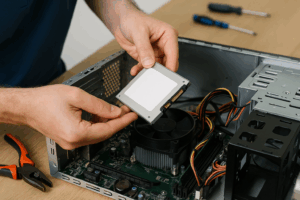
SSD and RAM upgrades are the fastest and most affordable ways to revive older computers.
One of the biggest myths is that an “old computer” is automatically obsolete. In reality, a few well-chosen upgrades can transform a sluggish laptop or desktop into a snappy machine.
- SSD Upgrades: Traditional hard drives (HDDs) are the #1 culprit for slow performance. Replacing one with a solid-state drive (SSD) makes boot times up to 10x faster. Milwaukee customers regularly tell us it feels like they bought a brand-new laptop.
- RAM (Memory) Upgrades: Adding 4–8GB of RAM gives your computer the breathing room it needs for modern apps and multitasking.
- Graphics & Wi-Fi Cards: For gamers, video editors, or streaming families, a graphics card or Wi-Fi card upgrade can extend usefulness without replacing the whole system.
Milwaukee Pricing Example:
At PCRuns, an SSD upgrade typically costs between $100–$150, installed—far less than a $900 new laptop.
Summary Bullets:
- SSD = biggest speed boost
- RAM = most affordable power-up
- Targeted upgrades save hundreds
2. Regular Maintenance: Keep It Clean, Inside & Out
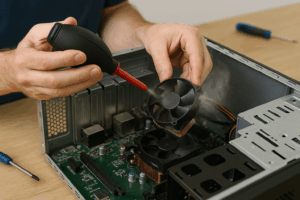
Seasonal cleaning keeps computers from overheating and extends hardware life.
Milwaukee’s seasonal swings—from dusty summers to icy winters—can take a toll on your computer. Dust buildup leads to overheating, while cold basements cause moisture issues. Preventive maintenance is the cheapest way to add years to your machine’s life.
- Dusting Fans & Vents: Keeps airflow strong and prevents heat-related slowdowns.
- Reapplying Thermal Paste: Ensures your CPU stays cool.
- Keyboard & Screen Cleaning: Prevents sticky keys and prolongs usability.
Local Tip: Milwaukee basements are notorious for being “computer graveyards.” If your computer lives downstairs, bring it up during winter to avoid cold boot-up damage.
Summary Bullets:
- Dust = the silent killer of PCs
- Clean hardware = stable performance
- Seasonal cleaning = longer lifespan
3. Protect Against Power Surges & Milwaukee Winters
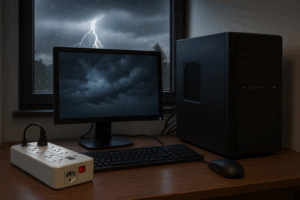
Surge protectors and UPS units protect Milwaukee computers from power spikes and outages.
Computers are sensitive to electrical issues, and Milwaukee storms are no joke. Power surges, outages, and winter cold all shorten a device’s life.
- Surge Protectors & Battery Backups: Prevent fried circuits during power spikes. A $25 surge strip can save a $700 laptop.
- Avoid Cold Starts: Booting a computer in a freezing basement stresses components. Let it warm to room temperature first.
- Stable Wi-Fi Setup: Families juggling online school, streaming, and remote work need consistent coverage. Place routers high and central.
Summary Bullets:
- Surge protection = cheap insurance
- Don’t power up in freezing temps
- Reliable Wi-Fi = less stress at home
4. Software Tune-Ups That Cost Little or Nothing

Free software tune-ups keep older Milwaukee computers running smoothly without hardware costs.
You don’t always need new hardware—sometimes, a little software cleanup does wonders.
- Uninstall Unnecessary Programs: Free up memory and improve startup times.
- Run Updates: Keeping Windows, drivers, and apps updated prevents bugs and performance issues.
- Install Free Tools: Malwarebytes for security, CCleaner (used carefully) for junk files.
Summary Bullets:
- Free software = big impact
- Updates = speed + security
- Tune-ups = smoother workflow
5. Smart Recycling & Repurposing in Milwaukee

Refurbished laptops give old computers a second life while helping local Milwaukee schools.
Sometimes, repairs don’t make sense. But that doesn’t mean your computer is worthless.
- Repurpose: Old desktops can serve as media servers, backup storage, or even retro gaming machines.
- Donate Locally: Schools, nonprofits, or community centers often welcome refurbished machines.
- PCRuns Refurbishing: We take in old computers, securely wipe data, and either refurbish or recycle them responsibly.
Summary Bullets:
- Don’t landfill computers—repurpose or donate
- Safe recycling protects data & environment
- PCRuns = eco-friendly Milwaukee option
6. Repair, Refurbish, or Rebuild: Making the Right Choice
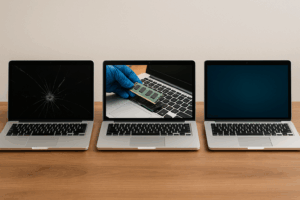
Milwaukee residents can choose to repair, refurbish, or rebuild based on cost and need.
Every computer eventually reaches a decision point.
- Repair: Fixing issues like cracked screens, failing batteries, or dead keyboards.
- Refurbish: Upgrading components and refreshing the system.
- Rebuild: Salvaging parts to assemble a new, affordable custom system.
PCRuns helps you evaluate which path makes the most sense based on cost, age, and your needs.
Summary Bullets:
- Repair = cheapest short-term fix
- Refurbish = best mid-budget option
- Rebuild = new life for old parts
Milwaukee Case Study: Saving $750 with a Simple Upgrade
“A Sherman Park teacher thought her laptop was dead. It took 10 minutes to boot and couldn’t run Zoom. She came to PCRuns ready to buy a new one. Instead, a $150 SSD upgrade and $50 RAM boost made it feel brand-new. He’s still teaching on it today—and saved over $750 compared to buying a replacement.”

A Sherman Park teacher saved hundreds with a refurbished laptop instead of buying new.
Conclusion: Your Local Tech Lifeline in Milwaukee
Don’t let your computer end up in a landfill—or drain your wallet unnecessarily. With smart upgrades, regular maintenance, and eco-friendly recycling, Milwaukee 53210 residents can stretch the life of their computers for years.
At PCRuns, we’re here to help with free diagnostics, affordable upgrades, and eco-friendly refurbishing. Whether you’re in Sherman Park, Uptown, or Enderis Park, we’re your local computer lifeline.
Call to Action:
👉 Bring your computer to PCRuns today for a free Milwaukee diagnostic. We’ll tell you whether to repair, refurbish, or rebuild—and save you money while keeping e-waste out of our landfills.
Related posts:
 Affordable Tech Solutions in Milwaukee: Repair, Refurbish, or Build?
 Rooftop Solar Panels Won’t Get Enough Sun if You Don’t Put Them at the Right Angle – CNET
 Tech Sustainability: How to Align Your Repairs with Environmental Goals
 When to Upgrade Your Business Technology: Signs, Strategies, and Real-World Lessons













