
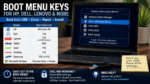
PCRuns Cloning Guide Start a Computer from a Cloning, Repair, or Windows USB A bootable USB drive cannot help until the computer actually starts from it. The safest method is usually the computer’s one-time boot menu, which lets you select the USB for this startup without permanently changing the normal boot order. The correct key […]
Hardware
If your computer won’t turn on, keeps overheating, makes strange noises, or feels painfully slow, the problem may not be software — it may be physical parts inside the machine.
This section explains computer hardware in simple terms, without jargon.
Here you’ll find help with:
-
Hard drive and SSD replacements
-
RAM upgrades for better speed
-
Overheating and fan issues
-
Battery replacement
-
Power problems
-
Screen damage
-
Motherboard concerns
-
Desktop component upgrades
Sometimes a slow or failing computer doesn’t need to be replaced. A simple part upgrade can make it feel new again.
Other times, replacement makes more financial sense — and we’ll tell you honestly when that’s the better option.
If you're in Milwaukee and unsure whether your computer is worth fixing, PCRuns offers straightforward evaluations with no pressure and no sales tactics — just real advice.
Hardware problems don’t have to mean starting over.
GPU VRAM vs Bandwidth: What Matters More at 1440p and 4K?

VRAM and memory bandwidth affect gaming performance in different ways—especially at 1440p and 4K. Learn what each spec does, how to spot the real bottleneck, and which settings to change first for smoother gameplay.
ATX 3.1 PSUs Explained: 12V-2×6, Transients, and Sizing Your Power Supply

ATX 3.1 power supplies are built for modern GPUs: better tolerance for sudden power spikes (transients) and improved 16-pin connector support (12V-2×6). Learn what changed, how to avoid common cable issues, and how to pick the right wattage without overbuying.
Air vs AIO Cooling for Mid-Tower PCs: Noise, Temps, and Fit (What Actually Matters)

Air cooler or AIO for a mid-tower build? Compare real-world noise, temperatures, and fit. Use simple checklists to choose the right cooler and avoid common clearance and mounting issues.
Choosing the Right CPU for Gaming and Productivity in 2026 (Without Overthinking It)

A clear, practical way to pick the right CPU in 2026 for both gaming and productivity. Learn which specs matter, how many cores you really need, and how to avoid common overspending and bottlenecks.
SSD & NVMe Upgrades: Maximizing Speed in 2025
Boost your PC’s performance with the latest SSD technology in Milwaukee, Wisconsin. 1. Why Upgrading to an SSD or NVMe Matters Now More Than Ever Solid State Drives (SSDs)—particularly the ultra-fast NVMe drives—have revolutionized personal computing. With prices dropping steadily in 2025, there has never been a better time for Milwaukee residents to upgrade […]
Setup & Configuration Services

New Windows Computer Setup Help in Milwaukee A new computer may be ready to power on, but it is rarely ready for comfortable everyday use. Windows updates, accounts, applications, file transfer, printers, browsers, security settings, and cloud storage all need to work together. I’m John Zettel, the owner and technician at PCRuns. I help Milwaukee-area […]
Screen & Hinge Repairs

Laptop Screen and Hinge Repair in Milwaukee A cracked display or broken hinge may involve more than one replaceable part. Damage can affect the LCD panel, touchscreen layer, display cable, bezel, lid, hinge brackets, mounting points, palmrest, or lower case. I’m John Zettel, the owner and technician at PCRuns. I help Milwaukee-area customers identify the […]
Hardware Installation & Upgrades

Computer Hardware Upgrades and Installation in Milwaukee The right hardware upgrade can extend a computer’s useful life, but not every available part is compatible or worth installing. The practical value depends on the computer’s age, condition, design, existing components, and how you use it. I’m John Zettel, the owner and technician at PCRuns. I help […]
Is Your Business Technology Holding You Back? 5 Clear Signs It’s Time for an Upgrade

Recognizing the Right Time to Invest in Modern Systems for Growth and Success Introduction In today’s fast-paced digital era, technology drives business growth, efficiency, and competitiveness. However, outdated technology can hinder productivity, expose businesses to security vulnerabilities, and escalate costs. Understanding when to upgrade your business technology is vital for staying ahead in your […]














